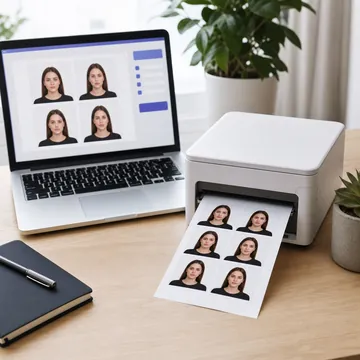
How to Print Passport Photos on 4x6 Paper
Let's be honest - paying $15+ for two tiny passport photos feels like robbery. Especially when a 4x6 photo print costs less than 50 cents at any drugstore. The secret? Our tool creates a print-ready 4x6 layout with 6 perfectly sized passport photos that you can print anywhere.
Whether you're printing at CVS, Walgreens, Costco, Walmart, or your home printer - the process is dead simple. Here's how to do it:
Upload Your Photo
Take a photo with your phone or use an existing one. Our AI automatically removes and replaces the background with white.
Select Your Country
Choose US (2x2 inch), UK (35x45mm), India (51x51mm), or any other country. We'll size it perfectly.
Download 4x6 Layout
Click "Download Print Layout" to get a 4x6 image with 6 passport photos arranged perfectly for printing.
Print & Cut
Print at CVS, Walgreens, or home. Cut along the lines. Done! You now have 6 passport photos for under a dollar.
Available Print Layouts
4 x 6 inches (10 x 15 cm)
Most popular! Standard photo print size. Available at all drugstores.
6 photos per sheet
A4 (210 x 297 mm)
Perfect for home printing. Standard printer paper size.
8 photos per sheet
5 x 7 inches (13 x 18 cm)
Slightly larger format. Good for bigger photos.
6-8 photos per sheet
Letter Size (8.5 x 11 in)
US standard paper. Great for home printing.
8-10 photos per sheet
Where to Print Your 4x6 Photo
| Store | 4x6 Price | Speed |
|---|---|---|
| CVS Pharmacy | $0.35-0.44 | Same day pickup |
| Walgreens | $0.35-0.44 | Same day pickup |
| Walmart Photo | $0.25-0.35 | Same day / 1 hour |
| Costco Photo | $0.17 | Next day pickup |
| Amazon Prints | $0.15 | 3-5 days delivery |
| Home Printer | ~$0.50 | Instant |
Frequently Asked Questions
How many passport photos can I fit on a 4x6 print?
You can fit 6 standard passport photos on a single 4x6 inch print. For US passport photos (2x2 inch), this means 3 columns 2 rows = 6 photos. For smaller sizes like 35x45mm (UK, EU), you can sometimes fit even more.
Will passport offices accept self-printed photos?
Yes! As long as your photo meets the official requirements (correct size, white background, proper lighting, etc.), it doesn't matter where it was printed. Passport offices care about the photo quality, not where you printed it. Our tool ensures compliance with all official requirements.
What's the best paper for printing passport photos?
Use glossy or matte photo paper (not regular printer paper). Most drugstore photo printing services use appropriate photo paper automatically. If printing at home, use photo paper rated at least 200 gsm for best results.
Can I print at CVS using my phone?
Absolutely! Save the 4x6 layout to your phone, then use the CVS or Walgreens app to upload and order prints. You can pick them up in about an hour. Select "4x6" as the print size and make sure "auto-enhance" is OFF.
Ready to Save Money on Passport Photos?
Stop paying $15+ for passport photos. Create your compliant photo, download the 4x6 layout, and print 6 photos for less than a dollar.
Create 4x6 Print Layout - Free!Frequently Asked Questions
What stores accept 4x6 passport photo prints?
Most drugstores and photo centers accept 4x6 prints including CVS, Walgreens, Costco, Walmart, Rite Aid, and Target. You can also print at home on any photo printer.
How much does it cost to print at CVS or Walgreens?
A standard 4x6 photo print costs around $0.35-$0.50. You get 6 passport photos on one sheet, making each photo just about $0.06 - saving you $15+ compared to in-store passport photo services.
Will the photos be the correct size?
Yes! Our templates are precisely calibrated. Just make sure to select "Actual Size" or "No Scaling" when printing, and turn off any auto-enhance features.
Can I print on glossy or matte paper?
Both work, but glossy paper is more common for passport photos. Some countries have specific requirements - check your country's guidelines if unsure.
How do I cut the photos after printing?
Use a ruler and craft knife (X-Acto) or sharp scissors. Cut along the guides we provide. A paper cutter gives the cleanest edges if you have one.
What if my photos get rejected?
Common reasons include wrong size, poor lighting, or expression issues. Our tool helps with sizing and background - just make sure your original photo meets face position and lighting requirements.